• Skip to primary navigation
  • Skip to main content
  • Skip to primary sidebar
Map Happy logo
  • Travel
    • Adventure
    • Leisure
    • Business
      • Loyalty
    • Student
    • Ladies
  • Trip Planning
    • Documentation
      • Customs
      • Passport
      • Visa
    • Reference Charts
    • Itinerary
    • Packing
    • Money
      • Budget
      • Luxury
      • Plastic
    • Technology
      • Photography
      • Connectivity
    • Language
  • Hacks
  • Transit
    • Flights
      • Airlines
      • Security
      • Airports
      • Lounges
    • Lodging
      • Hostels
      • Hotels
      • Vacation Rentals
        • Airbnb
    • Sea
      • Cruises
    • Ground
      • Bus
      • Cars
        • Taxis
          • Lyft
          • Uber
      • Public Transport
      • Trains
  • Expat
  • Features
    • Countries
      • Africa
      • Antarctica
      • Asia
      • Europe
      • North America
      • South America
      • Oceania
    • Guides
    • Culture & Science
    • Interviews
    • Opinion
  • Gear
    • Bags
  • Reviews
  • Tools
menu icon
go to homepage
  • Travel
    • Adventure
    • Leisure
    • Business
      • Loyalty
    • Student
    • Ladies
  • Trip Planning
    • Documentation
      • Customs
      • Passport
      • Visa
    • Reference Charts
    • Itinerary
    • Packing
    • Money
      • Budget
      • Luxury
      • Plastic
    • Technology
      • Photography
      • Connectivity
    • Language
  • Hacks
  • Transit
    • Flights
      • Airlines
      • Security
      • Airports
      • Lounges
    • Lodging
      • Hostels
      • Hotels
      • Vacation Rentals
        • Airbnb
    • Sea
      • Cruises
    • Ground
      • Bus
      • Cars
        • Taxis
          • Lyft
          • Uber
      • Public Transport
      • Trains
  • Expat
  • Features
    • Countries
      • Africa
      • Antarctica
      • Asia
      • Europe
      • North America
      • South America
      • Oceania
    • Guides
    • Culture & Science
    • Interviews
    • Opinion
  • Gear
    • Bags
  • Reviews
  • Tools
    • Facebook
    • Instagram
    • Pinterest
  • subscribe
    search icon
    Homepage link
    • Travel
      • Adventure
      • Leisure
      • Business
        • Loyalty
      • Student
      • Ladies
    • Trip Planning
      • Documentation
        • Customs
        • Passport
        • Visa
      • Reference Charts
      • Itinerary
      • Packing
      • Money
        • Budget
        • Luxury
        • Plastic
      • Technology
        • Photography
        • Connectivity
      • Language
    • Hacks
    • Transit
      • Flights
        • Airlines
        • Security
        • Airports
        • Lounges
      • Lodging
        • Hostels
        • Hotels
        • Vacation Rentals
          • Airbnb
      • Sea
        • Cruises
      • Ground
        • Bus
        • Cars
          • Taxis
            • Lyft
            • Uber
        • Public Transport
        • Trains
    • Expat
    • Features
      • Countries
        • Africa
        • Antarctica
        • Asia
        • Europe
        • North America
        • South America
        • Oceania
      • Guides
      • Culture & Science
      • Interviews
      • Opinion
    • Gear
      • Bags
    • Reviews
    • Tools
    • Facebook
    • Instagram
    • Pinterest
  • ×

    How To Remove Annoying Tourists From Your Photos

    Published/Updated: Aug 11, 2025 · Erica Ho · 1 minute read

    Deke

    It's actually a lot simpler than you think it is: The Eiffel Tower without tourists. Fantastique!

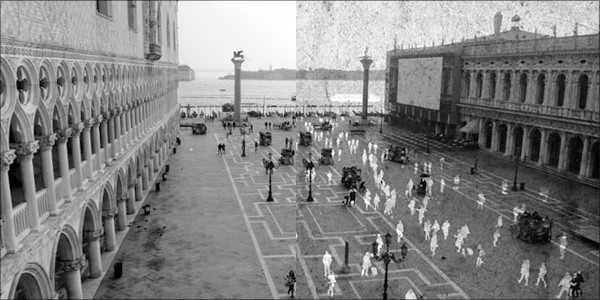
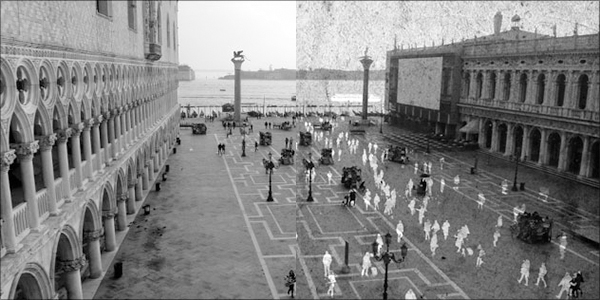
    So if you want to eradicate people from your photos, there are going to be a couple of things that you need. First you need photos (makes sense, right?), preferably lots and lots of them - of the same angle over and over. And because you need photos of the same scene, you'll either need a tripod or the iron grip of Superman to stabilize your shots.

    Once that's all set, you can head over to Snapmania and create a free account. Once you've uploaded your photos, all you have to do is apply the Tourist Remover filter. You need at least a couple of photos, and with fingers crossed, you can proclaim that Chinese officials gave you a private tour of the Great Wall.

    Luckily, if it doesn't work, there are other methods. The second option requires some Photoshop mojo, or more specifically, access to a copy of Photoshop. You'll need the Extended version of Photoshop CS3+ or above so any old version just won't work. (It should work for CS4, CS5 and CS6.)

    Instructions are going to vary for different versions of Photoshop, but the basic gist is the same. Open all your different shots into the program, and once you're there, run the Image Stack feature to remove people:

    An image stack combines a group of images with a similar frame of reference, but differences of quality or content across the set. Once combined in a stack, you can process the multiple images to produce a composite view that eliminates unwanted content or noise.

    In this case, "unwanted content or noise" would refer to the tourists in your photo. It's possible to banish those drunk Americans from your Cabos pictures, if not from your memory.

    The basic instructions are as follows, for the most recent versions of Photoshop (if you've got CS3, it might be time to upgrade. Adobe also has a more detailed guide if you run into problems):

    1. Combine the separate images into one multi-layered image. (An image stack must contain at least two layers.)
    2. Choose Select > All Layers.
    3. Choose Edit > Auto-Align Layers and select Auto as the alignment option.
    4. Choose Layer > Smart Objects > Convert to Smart Object.
    5. Choose Layer > Smart Objects > Stack Mode > Median.

    Once that's done, you can edit your photo if there glitches in the processing, but the whole process isn't entirely too complicated.

    • Save

    Popular Posts

    Can Someone Else Deposit a Check for Me While I'm Out of Town?

    The Best Away Luggage Alternatives

    Primary Sidebar

    👉 Add Map Happy to Google Preferred Sources

    Some posts contain affiliate links.
    These links support our work.
    This is our official policy on generative AI use.

    Erica Ho

    Erica Ho

    Erica Ho is a former reporter for TIME in Hong Kong and former geek at Gizmodo and Lifehacker. Her work has appeared in CNN, Yahoo!, MSN, Mashable, Travel + Leisure, Conde Nast Traveler and Quartz to name a few places.

    The good ol' days! I remember creeping as a former The good ol' days! I remember creeping as a former expat, and honestly, stumbling into the most random places as a traveler  😅 

It is not every day you stumble into someone else's living room for a private jazz concert, and if you happen to be down in Mexico City, check out @laa_esquina (send a DM!). 

Twice a month. It's the best kind of Saturday night, even if I can't stay up that late anymore!
    Follow on Instagram

    Footer

    ↑ back to top

    About

    • Privacy
    • Editorial Guidelines
    • Terms of Service
    • AI Disclosure

    Follow

    • email updates

    Contact

    FAQ


    Copyright © 2024 Map Happy

    • Facebook
    • Pinterest
    • Twitter
    • Reddit
    • WhatsApp
    • Email
    • Print