
• Skip to primary navigation
  • Skip to main content
  • Skip to primary sidebar
Map Happy logo
  • Travel
    • Adventure
    • Leisure
    • Business
      • Loyalty
    • Student
    • Ladies
  • Trip Planning
    • Documentation
      • Customs
      • Passport
      • Visa
    • Reference Charts
    • Itinerary
    • Packing
    • Money
      • Budget
      • Luxury
      • Plastic
    • Technology
      • Photography
      • Connectivity
    • Language
  • Hacks
  • Transit
    • Flights
      • Airlines
      • Security
      • Airports
      • Lounges
    • Lodging
      • Hostels
      • Hotels
      • Vacation Rentals
        • Airbnb
    • Sea
      • Cruises
    • Ground
      • Bus
      • Cars
        • Taxis
          • Lyft
          • Uber
      • Public Transport
      • Trains
  • Expat
  • Features
    • Countries
      • Africa
      • Antarctica
      • Asia
      • Europe
      • North America
      • South America
      • Oceania
    • Guides
    • Culture & Science
    • Interviews
    • Opinion
  • Gear
    • Bags
  • Reviews
  • Tools
menu icon
go to homepage
  • Travel
    • Adventure
    • Leisure
    • Business
      • Loyalty
    • Student
    • Ladies
  • Trip Planning
    • Documentation
      • Customs
      • Passport
      • Visa
    • Reference Charts
    • Itinerary
    • Packing
    • Money
      • Budget
      • Luxury
      • Plastic
    • Technology
      • Photography
      • Connectivity
    • Language
  • Hacks
  • Transit
    • Flights
      • Airlines
      • Security
      • Airports
      • Lounges
    • Lodging
      • Hostels
      • Hotels
      • Vacation Rentals
        • Airbnb
    • Sea
      • Cruises
    • Ground
      • Bus
      • Cars
        • Taxis
          • Lyft
          • Uber
      • Public Transport
      • Trains
  • Expat
  • Features
    • Countries
      • Africa
      • Antarctica
      • Asia
      • Europe
      • North America
      • South America
      • Oceania
    • Guides
    • Culture & Science
    • Interviews
    • Opinion
  • Gear
    • Bags
  • Reviews
  • Tools
    • Facebook
    • Instagram
    • Pinterest
  • subscribe
    search icon
    Homepage link
    • Travel
      • Adventure
      • Leisure
      • Business
        • Loyalty
      • Student
      • Ladies
    • Trip Planning
      • Documentation
        • Customs
        • Passport
        • Visa
      • Reference Charts
      • Itinerary
      • Packing
      • Money
        • Budget
        • Luxury
        • Plastic
      • Technology
        • Photography
        • Connectivity
      • Language
    • Hacks
    • Transit
      • Flights
        • Airlines
        • Security
        • Airports
        • Lounges
      • Lodging
        • Hostels
        • Hotels
        • Vacation Rentals
          • Airbnb
      • Sea
        • Cruises
      • Ground
        • Bus
        • Cars
          • Taxis
            • Lyft
            • Uber
        • Public Transport
        • Trains
    • Expat
    • Features
      • Countries
        • Africa
        • Antarctica
        • Asia
        • Europe
        • North America
        • South America
        • Oceania
      • Guides
      • Culture & Science
      • Interviews
      • Opinion
    • Gear
      • Bags
    • Reviews
    • Tools
    • Facebook
    • Instagram
    • Pinterest
  • ×

    What Is WhatsApp Web and How Do You Use It?

    Published/Updated: Jul 9, 2025 · Erica Ho · 1 minute read

    Placeit

    Using a keyboard is sooo much easier than being constricted to three inches to tap out that rant (or sharing how great that Popeye's chicken sandwich really is).1

    Besides being the greatest invention on Earth, WhatsApp Web is pretty much a cross-platform iMessage that allows WhatsApp users to receive and send messages through a linked computer.

    Though we were early WhatsApp Web haters (goes to prove, don't knock it 'til you try it), it's a really needed service in a couple of ways: It allows WhatsApp users to receive and send messages on one device without needing to switch between a phone and computer constantly.

    Basically, it's really great when you are already focused on one task and want to handle all the incoming messages without breaking a sweat. Or my entire work life.

    One of the more interesting quirks we noticed in our years of using it is that a phone and computer don't need to be connected to the same network in order to work together (meaning, it's possible to use WhatsApp Web at the office even if you've accidentally left the phone at home).

    Some users have even reported leaving the phone in a different country and being able to use the WhatsApp Web thousands of miles away though this obviously raises some questions!

    How do I use WhatsApp Web?

    It goes without saying, but users should really have the app downloaded on their phone. 😁

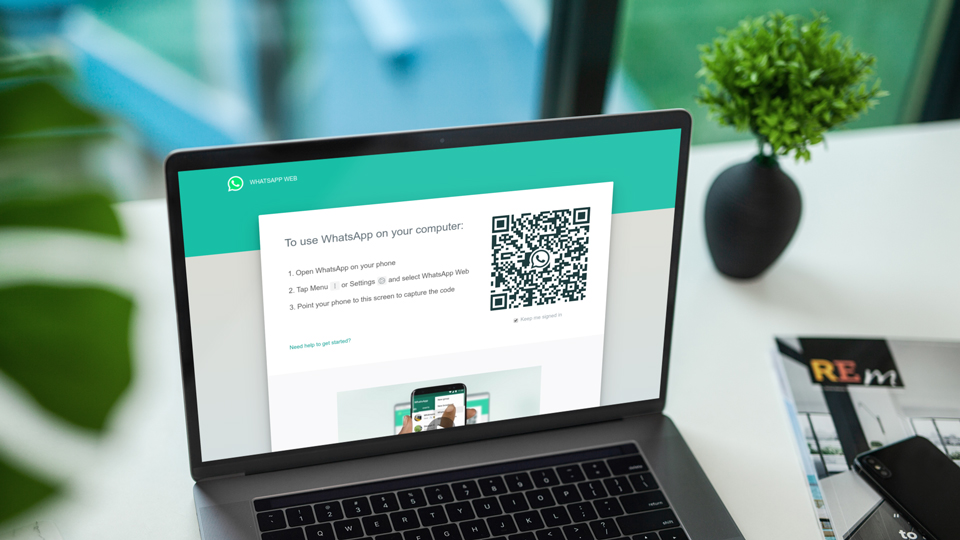
    From there, they need to download the WhatsApp computer program or open their browser of choice to https://web.whatsapp.com. Both will display a QR code that needs to be linked to the app.

    (There are a few browsers like Opera that already integrate WhatsApp Web for those willing to use alternative browsers.)

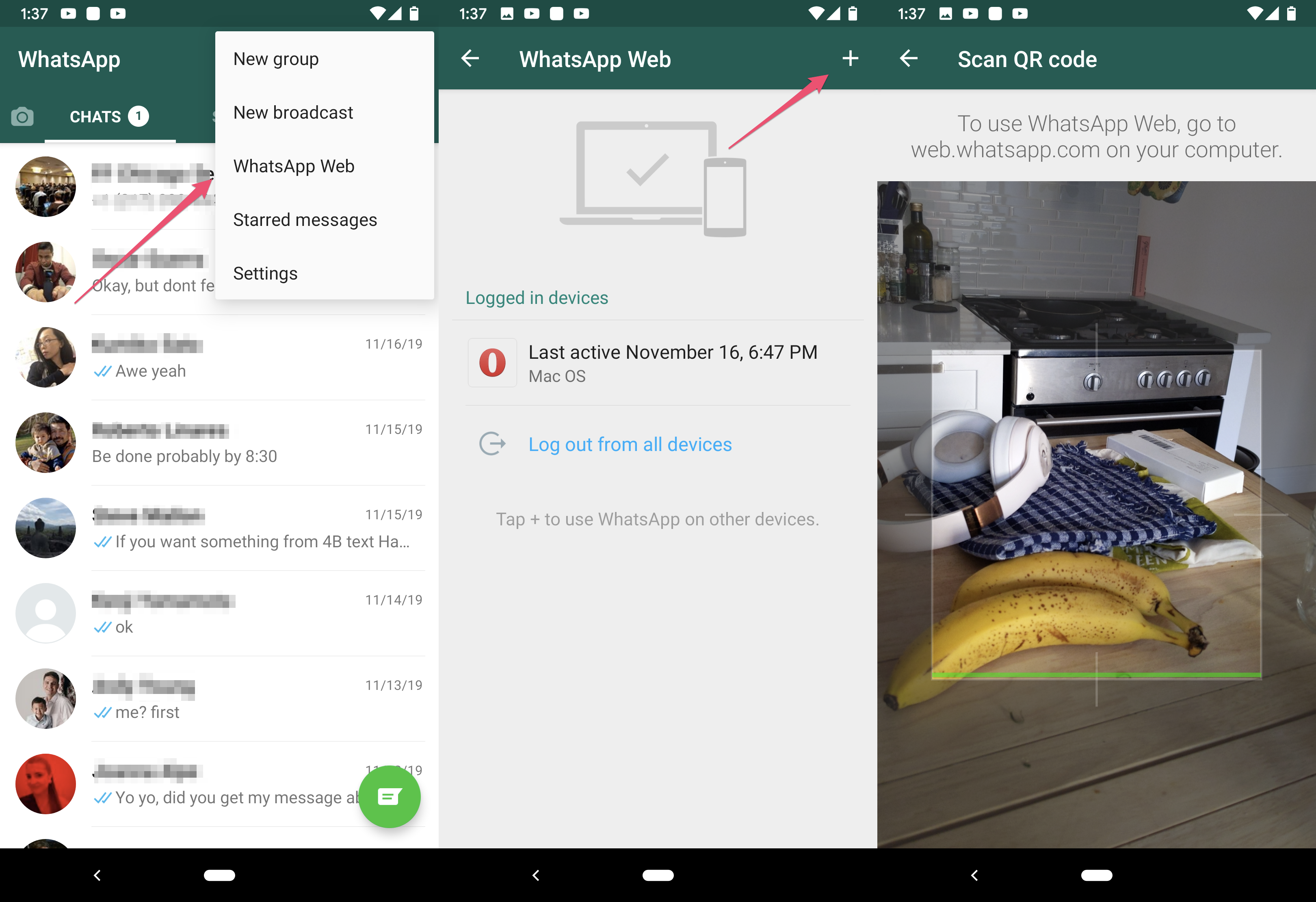
    Head into the main chat screen on the app, click on the upper right hand on the button, and select WhatsApp Web. On the next screen, tap the sign in the same corner. Then it will pull up a scanny thingy that you can use to scan the QR code displayed on the screen.

    Here's also a quick slideshow and video for those that like a more visual explanation:
    • Save

    Click to see full size.

    Now you're ready for those WhatsApp diatribes.
    1 footnote

    1. Yes, at least we think it is that great! ↩
    • Save

    Popular Posts

    The Best Away Luggage Alternatives

    Review: The Away Suitcase Disappoints in the Long Run

    Primary Sidebar

    TL;DR

    WhatsApp Web is a really great crossplatform messaging system to handle all incoming messages without switching devices.

    👉 Add Map Happy to Google Preferred Sources

    Some posts contain affiliate links.
    These links support our work.
    This is our official policy on generative AI use.

    Erica Ho

    Erica Ho

    Erica Ho is a former reporter for TIME in Hong Kong and former geek at Gizmodo and Lifehacker. Her work has appeared in CNN, Yahoo!, MSN, Mashable, Travel + Leisure, Conde Nast Traveler and Quartz to name a few places.

    The good ol' days! I remember creeping as a former The good ol' days! I remember creeping as a former expat, and honestly, stumbling into the most random places as a traveler  😅 

It is not every day you stumble into someone else's living room for a private jazz concert, and if you happen to be down in Mexico City, check out @laa_esquina (send a DM!). 

Twice a month. It's the best kind of Saturday night, even if I can't stay up that late anymore!
    Follow on Instagram

    Footer

    ↑ back to top

    About

    • Privacy
    • Editorial Guidelines
    • Terms of Service
    • AI Disclosure

    Follow

    • email updates

    Contact

    FAQ


    Copyright © 2024 Map Happy

    • Facebook
    • Pinterest
    • Twitter
    • Reddit
    • WhatsApp
    • Email
    • Print