• Skip to primary navigation
  • Skip to main content
  • Skip to primary sidebar
Map Happy logo
  • Travel
    • Adventure
    • Leisure
    • Business
      • Loyalty
    • Student
    • Ladies
  • Trip Planning
    • Documentation
      • Customs
      • Passport
      • Visa
    • Reference Charts
    • Itinerary
    • Packing
    • Money
      • Budget
      • Luxury
      • Plastic
    • Technology
      • Photography
      • Connectivity
    • Language
  • Hacks
  • Transit
    • Flights
      • Airlines
      • Security
      • Airports
      • Lounges
    • Lodging
      • Hostels
      • Hotels
      • Vacation Rentals
        • Airbnb
    • Sea
      • Cruises
    • Ground
      • Bus
      • Cars
        • Taxis
          • Lyft
          • Uber
      • Public Transport
      • Trains
  • Expat
  • Features
    • Countries
      • Africa
      • Antarctica
      • Asia
      • Europe
      • North America
      • South America
      • Oceania
    • Guides
    • Culture & Science
    • Interviews
    • Opinion
  • Gear
    • Bags
  • Reviews
  • Tools
menu icon
go to homepage
  • Travel
    • Adventure
    • Leisure
    • Business
      • Loyalty
    • Student
    • Ladies
  • Trip Planning
    • Documentation
      • Customs
      • Passport
      • Visa
    • Reference Charts
    • Itinerary
    • Packing
    • Money
      • Budget
      • Luxury
      • Plastic
    • Technology
      • Photography
      • Connectivity
    • Language
  • Hacks
  • Transit
    • Flights
      • Airlines
      • Security
      • Airports
      • Lounges
    • Lodging
      • Hostels
      • Hotels
      • Vacation Rentals
        • Airbnb
    • Sea
      • Cruises
    • Ground
      • Bus
      • Cars
        • Taxis
          • Lyft
          • Uber
      • Public Transport
      • Trains
  • Expat
  • Features
    • Countries
      • Africa
      • Antarctica
      • Asia
      • Europe
      • North America
      • South America
      • Oceania
    • Guides
    • Culture & Science
    • Interviews
    • Opinion
  • Gear
    • Bags
  • Reviews
  • Tools
    • Facebook
    • Instagram
    • Pinterest
  • subscribe
    search icon
    Homepage link
    • Travel
      • Adventure
      • Leisure
      • Business
        • Loyalty
      • Student
      • Ladies
    • Trip Planning
      • Documentation
        • Customs
        • Passport
        • Visa
      • Reference Charts
      • Itinerary
      • Packing
      • Money
        • Budget
        • Luxury
        • Plastic
      • Technology
        • Photography
        • Connectivity
      • Language
    • Hacks
    • Transit
      • Flights
        • Airlines
        • Security
        • Airports
        • Lounges
      • Lodging
        • Hostels
        • Hotels
        • Vacation Rentals
          • Airbnb
      • Sea
        • Cruises
      • Ground
        • Bus
        • Cars
          • Taxis
            • Lyft
            • Uber
        • Public Transport
        • Trains
    • Expat
    • Features
      • Countries
        • Africa
        • Antarctica
        • Asia
        • Europe
        • North America
        • South America
        • Oceania
      • Guides
      • Culture & Science
      • Interviews
      • Opinion
    • Gear
      • Bags
    • Reviews
    • Tools
    • Facebook
    • Instagram
    • Pinterest
  • ×

    The Best Passport Visa Photo Apps for Android

    Published/Updated: Nov 20, 2025 · Erica Ho · 3 minute read

    Andrea Piacquadio / Pexels

    It is not often we clutter our brand-new phone with five different passport photo making apps. It's worth it in the name of finding the best photo that will haunt stay with you for years to come.

    Roughly, what we found was that the mobile apps had really poor enhancement tools, but were great for getting the right size. Most of the apps were loaded with ads: PhotoAiD has the simplest, most expensive option; while ID Photo provided the simplest, user-friendly free option (with additional third-party help).

    Luckily, most of the paid options give a refund guarantee if the photo is rejected.

    Really, a great photo will save a lot of work. Here are some guidelines in case it has been ten years: No Instagram selfies. Pure white background (no shadows, so no extra lighting!), with a neutral expression. It's ok to half-smile.

    This will be memorialized forever, as an official government document.

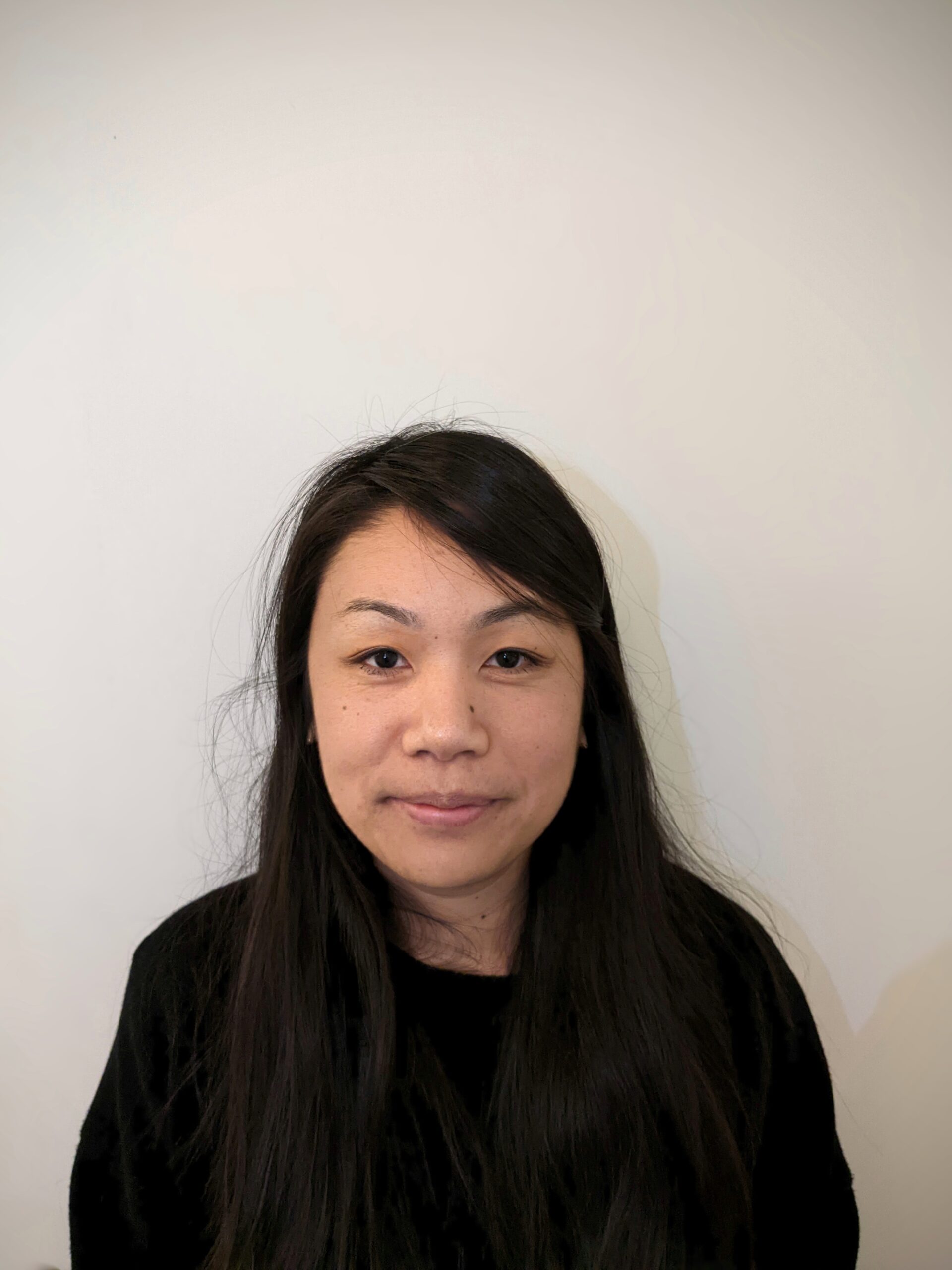
    To see how most of the apps fare, we took a generic phone photo, like most people will. Going into this, though, provided the best assessment.

    Here's our happy mugshot. Before we go further, there are actually a couple of things wrong with this. There are shadows on the wall, and I'm not entirely sure the wallpaper is white. (Is it cream?)

    (Can't wait to delete. Delete. Also delete Bumble.)

    The requirements for a new passport photo

    Photos within 6 months, please! Definitely no filters.

    If you're submitting a physical photo-aka not renewing a passport online-the photo should be 2"x 2" (51 x 51 mm) with the head centered and sized between 1" and 1.4" (25 and 35 mm).

    For online photos, there is actually an official online cropping tool, though honestly it doesn't seem to matter what tool you end up ultimately using.

    Straight from the U.S. State Department, this is what you should be aiming for:

    Special Requirements for a Digital Photo

    Photo Element Requirement
    Dimensions Your photo must be at least 600 x 600 pixels. If you have a friend or family member take your photo, make sure the image has large dimensions and there is ample space around your head and torso to allow room for automatic cropping by our photo tool. The dimensions can be rectangular.
    Color Your photo must be in color (24 bits per pixel) in sRGB color space which is the common output for most digital cameras.
    Format Your photo must be in JPEG file format.
    Size Your photo must be at least 54 kilobytes and no more than 10 megabytes.
    Compression Your photo's compression ratio should be less than or equal to 20:1. Use the highest quality settings on your camera so your photo maintains clarity and resolution. When saving and emailing your photo, select the highest quality setting (large file size). Do not edit or digitally manipulate your photo. To avoid compressing your image, do not send the image via text message or save it to a cloud-based application.

    ID Photo

    This was by far in our opinion, the best app in terms of functionality and cost ).

    There wasn't a feature for us to remove the background, so we ended up using the app remove.bg separately, and then uploading it into ID Photo.

    This also let us download the photo for free on the phone. It also gave us an image we would be able to later take to a CVS, Walgreens or photo printer.

    PhotoAiD

    This was the easiest one to use, but also the most expensive. Once a photo is selected, the app virtually does everything in one click. It covers passport photos, and visa issues for an wide slew of countries.

    The free ad-based version crops the photo, but won't take care of any issues.

    The preview, premium paid-version of our photo looked great, but it cost $13.95 for the digital photo, and $16.95 for the digital and printout. The app guarantees a refund if it not approved by the issuing authority.

    This is the best option for people who don't want to spend 30 minutes haggling over a bunch of photo apps.

    Time is money, after all.

    Passport Photo

    This app is primarily focused on getting the right photo sizes for different passports around the world.

    For visa photos, we'd pass on this, since there didn't seem to be many country options.

    This one seemed okay, and a little barebones. Primarily, the ads were confusing toward the end, and it was a bit difficult and convoluted on saving a photo. At least you get a free photo!

    Passport Photo Maker (or Editor)

    The editing tools weren't very good and the app was full of ads. This was the most difficult to navigate.

    There were three paid options ($2.99 to remove ads, $3.99 to print photos of different sizes, $4.99 to remove background, and the full version for $6.99). In short, we think there's a developer that is really struggling out here.

    We did try watching an ad to remove the background, but it was not a very good feature.

    This would have been our second choice for an all-in-one solution based on full version, for second-cheapest price.
    • Save

    Popular Posts

    Going Everywhere with the Away Everywhere Bag

    Review: Around the World With the Monos Carry-On in 100 Days

    Primary Sidebar

    TL;DR

    Most of the passport photo apps were terrible, expensive, or cluttered with ads. But if you're going to do it, PhotoAiD has the simplest, most expensive option; while ID Photo provided the simplest, user-friendly free option.

    Stick to the official online tools, and you will save yourself a lot of time.

    👉 Add Map Happy to Google Preferred Sources

    Some posts contain affiliate links.
    These links support our work.
    This is our official policy on generative AI use.

    Erica Ho

    Erica Ho

    Erica Ho is a former reporter for TIME in Hong Kong and former geek at Gizmodo and Lifehacker. Her work has appeared in CNN, Yahoo!, MSN, Mashable, Travel + Leisure, Conde Nast Traveler and Quartz to name a few places.

    The good ol' days! I remember creeping as a former The good ol' days! I remember creeping as a former expat, and honestly, stumbling into the most random places as a traveler  😅 

It is not every day you stumble into someone else's living room for a private jazz concert, and if you happen to be down in Mexico City, check out @laa_esquina (send a DM!). 

Twice a month. It's the best kind of Saturday night, even if I can't stay up that late anymore!
    Follow on Instagram

    Footer

    ↑ back to top

    About

    • Privacy
    • Editorial Guidelines
    • Terms of Service
    • AI Disclosure

    Follow

    • email updates

    Contact

    FAQ


    Copyright © 2024 Map Happy

    • Facebook
    • Pinterest
    • Twitter
    • Reddit
    • WhatsApp
    • Email
    • Print