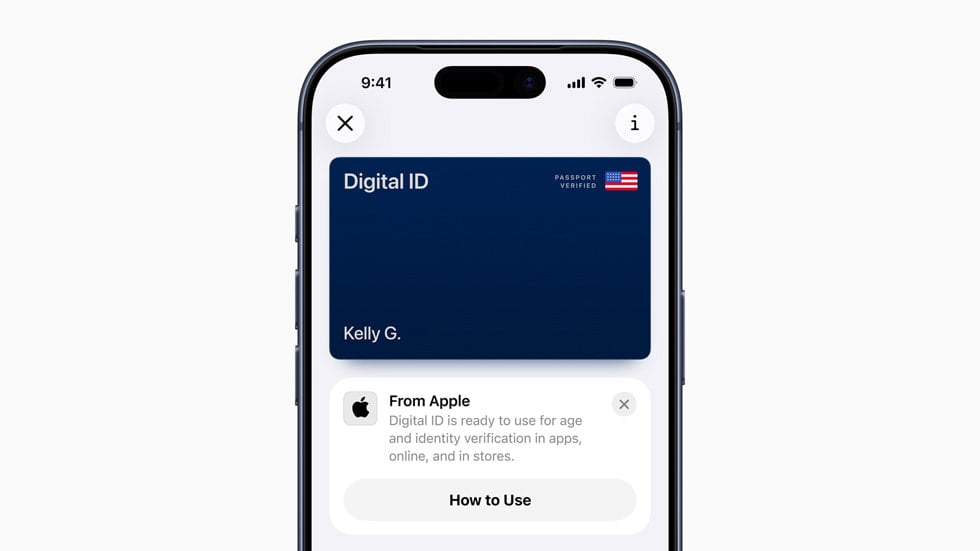

Maybe I'm just a few days behind, but Apple has launched Digital ID, which allows travelers to store their passport and driver license into their Apple Wallet, with only the need to present their iPhone or Apple Watch.
(One Mile at a Time reports that to create a Digital ID in Wallet, travelers must have a valid unexpired U.S. passport and an iPhone 11 or later with iOS 26.1 or later, or Apple Watch Series 6 or later with watchOS 26.1 or later.)
This seems like a great way for folks who do not yet have REAL IDs to safely store their passport details on their phone without carrying it around for domestic flights.
Starting last week, this initiative has already been rolled out at TSA checkpoints at more than 250 airports in the U.S.
Though we don't have the full list (yet), an Apple rep confirmed to us it does include some of the more major airports such as San Francisco International Airport (SFO), John F. Kennedy International Airport (JFK), and Miami International Airport (MIA).
For the moment, it is for domestic use only, and not for international use. Though, it is not hard to imagine Apple taking over the world and having this feature rolled out internationally in some weird, distant far-off future.
Even in the official press release, Apple has clearly stated that, "Digital ID is not a replacement for a physical passport, and cannot be used for international travel and border crossing in lieu of a U.S. passport." 😉
Apple users have been able to add a driver's license or state ID to Apple Wallet since 2022, though that feature is only live in 12 states and Puerto Rico.
(The Apple representative confirmed this includes Arizona, California, Colorado, Georgia, Hawaii, Iowa, Maryland, Montana, New Mexico, North Dakota, Ohio, and West Virginia at present.)
The company notes that the ID data is encrypted and stored only on your device, and that Apple does not and cannot track where/when the Digital ID is used. (It can only be approved and presented using Face ID/Touch ID.)
The question remains, how much do you trust Apple? 🤔
Here are the full instructions how to add your passport or driver license (and we've gone ahead and excerpted it here as well!)
- Open the Wallet app on the iPhone.
- Tap the + (Add) button at the top right.
- Select Driver's License or ID Cards.
- Choose Digital ID.
- Follow the on screen directions to begin setup.
- Scan the photo page of the passport with your iPhone.
- Hold the iPhone over the passport chip to read it.
- Take a selfie for identity verification.
- Complete the required facial/head movements.
- Wait for verification-your Digital ID will automatically be added to Wallet.
Read the full press release here.