
• Skip to primary navigation
  • Skip to main content
  • Skip to primary sidebar
Map Happy logo
  • Travel
    • Adventure
    • Leisure
    • Business
      • Loyalty
    • Student
    • Ladies
  • Trip Planning
    • Documentation
      • Customs
      • Passport
      • Visa
    • Reference Charts
    • Itinerary
    • Packing
    • Money
      • Budget
      • Luxury
      • Plastic
    • Technology
      • Photography
      • Connectivity
    • Language
  • Hacks
  • Transit
    • Flights
      • Airlines
      • Security
      • Airports
      • Lounges
    • Lodging
      • Hostels
      • Hotels
      • Vacation Rentals
        • Airbnb
    • Sea
      • Cruises
    • Ground
      • Bus
      • Cars
        • Taxis
          • Lyft
          • Uber
      • Public Transport
      • Trains
  • Expat
  • Features
    • Countries
      • Africa
      • Antarctica
      • Asia
      • Europe
      • North America
      • South America
      • Oceania
    • Guides
    • Culture & Science
    • Interviews
    • Opinion
  • Gear
    • Bags
  • Reviews
  • Tools
menu icon
go to homepage
  • Travel
    • Adventure
    • Leisure
    • Business
      • Loyalty
    • Student
    • Ladies
  • Trip Planning
    • Documentation
      • Customs
      • Passport
      • Visa
    • Reference Charts
    • Itinerary
    • Packing
    • Money
      • Budget
      • Luxury
      • Plastic
    • Technology
      • Photography
      • Connectivity
    • Language
  • Hacks
  • Transit
    • Flights
      • Airlines
      • Security
      • Airports
      • Lounges
    • Lodging
      • Hostels
      • Hotels
      • Vacation Rentals
        • Airbnb
    • Sea
      • Cruises
    • Ground
      • Bus
      • Cars
        • Taxis
          • Lyft
          • Uber
      • Public Transport
      • Trains
  • Expat
  • Features
    • Countries
      • Africa
      • Antarctica
      • Asia
      • Europe
      • North America
      • South America
      • Oceania
    • Guides
    • Culture & Science
    • Interviews
    • Opinion
  • Gear
    • Bags
  • Reviews
  • Tools
    • Facebook
    • Instagram
    • Pinterest
  • subscribe
    search icon
    Homepage link
    • Travel
      • Adventure
      • Leisure
      • Business
        • Loyalty
      • Student
      • Ladies
    • Trip Planning
      • Documentation
        • Customs
        • Passport
        • Visa
      • Reference Charts
      • Itinerary
      • Packing
      • Money
        • Budget
        • Luxury
        • Plastic
      • Technology
        • Photography
        • Connectivity
      • Language
    • Hacks
    • Transit
      • Flights
        • Airlines
        • Security
        • Airports
        • Lounges
      • Lodging
        • Hostels
        • Hotels
        • Vacation Rentals
          • Airbnb
      • Sea
        • Cruises
      • Ground
        • Bus
        • Cars
          • Taxis
            • Lyft
            • Uber
        • Public Transport
        • Trains
    • Expat
    • Features
      • Countries
        • Africa
        • Antarctica
        • Asia
        • Europe
        • North America
        • South America
        • Oceania
      • Guides
      • Culture & Science
      • Interviews
      • Opinion
    • Gear
      • Bags
    • Reviews
    • Tools
    • Facebook
    • Instagram
    • Pinterest
  • ×

    How Does Google Maps' Offline Navigation Hold Up?

    Published/Updated: Jul 22, 2025 · Erica Ho · 2 minute read

    Placeit

    Offline navigation plus moving, thousand-ton targets isn't my idea of a good time. But there must be geniuses at Google, because I can vouch that I'm still alive and made it all to my destinations without incident.

    About two months ago, Google Maps announced that it would be adding offline turn-by-turn navigation to its Maps app. It sounded great in theory but it usually takes a volunteer to see who's willing to risk their life in L.A. traffic to see how exactly accurate it was. But curiosity got the best of me and it was time to take offline navigation for a test drive.

    Remember there's prep involved

    In order to drive offline, Google Maps requires the user to download the map beforehand. To be clear, the company clearly states:

    By default, we'll only download areas to your device when you are on a Wi-Fi connection to prevent large data fees.

    In order to download the map, zoom in or zoom out to the area to download. Be aware any area outside of this will not be downloaded.

    Users will have to hit the menu button in the upper-left corner to initiate the process, then scroll down to Offline areas. Hit the bottom-right blue plus button to add an area. Maps will then prompt phone users to download the area.

    At this particular stage, Maps will let you know how big the download is and how much space is left on the phone. Most of my downloads, which included maps of Los Angeles and Tucson, ranged from 38.5 MB to 257 MB. (There does seem to be a cap. The entirety of Los Angeles seemed to require 1,500 MB of space. The minute I got larger than this, Maps informed me that the area was too large.)

    Name the map. Please note, it may not work with offline areas Google already has problems with.

    Taking the first baby steps

    So here's the thing. Know how sometimes you just hit 'movies' in Maps to get approximate place? That's too much for offline navigation. You must know your target destination or address.

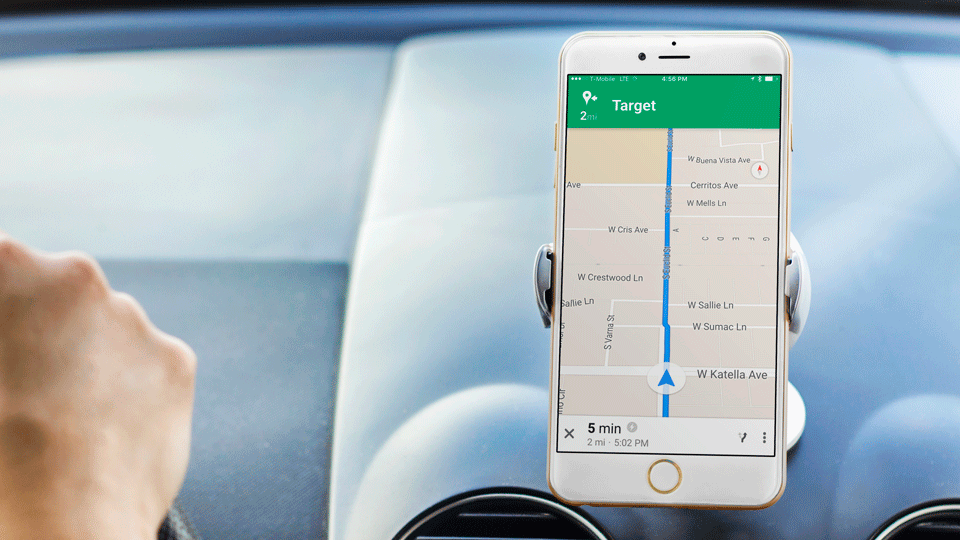
    But I wanted to take it easy to a place where I knew it would be easy to get to (and where I also needed to run a few errands). Thus the guinea pig would be... Target. (I also tied it to my car's Bluetooth system for extra safety.)

    Curiously enough, Maps performed superbly with keeping up with the streets as I crossed and got near them, not like that's a safe thing to check constantly on the road. Cough, *definitely not* do that.

    Voice navigation was curiously absent but I arrived at Target safely driving in a straight line for five minutes.

    Getting more adventurous

    This is when I decided to take things for a spin and got a little bit more courageous. The next destination would be In-N-Out.  This time, the voice nav started working and would continue to work reliably.

    Predictably, I got there. Then I decided to do something a little different. It was time to go off-route on purpose and see if Google would reroute me as I deviated from the planned course. Amazingly, at every single turn, the further I got away from In-N-Out, it would reroute me back to the quickest way back to the burger joint depending on the location. I was sold.

    Using it in unknown areas

    But like any rational person knows, the real test is how to see it performs in areas where the driver isn't familiar. Later in West L.A., I needed to drop by a friend's apartment to pick up something I had left in her car the night before. I had never been there before.

    In general, there were a few times where the voice navigation was slightly out of sync with the turn, though it was often a matter of 30 seconds or within 100 feet. This hadn't occurred before with the previous test runs, but maybe that's the certainty of connected navigation: it is ridiculously accurate to a fault.

    At one point, I was slightly confused: It would tell me to turn left three times in a row, which I thought was a technical glitch. I followed it anyway-because I had no choice to see if it was accurate-and it turns out it just meant it wanted me to turn left three separate times in a row.

    But more importantly, it did lead me to the destination without getting lost. Which only made it more hilarious, that when I did turn on the data, I ended up driving around at least five times to just get on the freeway. C'est la vie.

    • Save

    Popular Posts

    Review: How Zipcar Fares For Getting Around Town

    The Best Away Luggage Alternatives

    Primary Sidebar

    TL;DR

    Google Maps' offline navigation performed flawlessly going to Target and In-N-Out. Omg, stop the presses!

    👉 Add Map Happy to Google Preferred Sources

    Some posts contain affiliate links.
    These links support our work.
    This is our official policy on generative AI use.

    Erica Ho

    Erica Ho

    Erica Ho is a former reporter for TIME in Hong Kong and former geek at Gizmodo and Lifehacker. Her work has appeared in CNN, Yahoo!, MSN, Mashable, Travel + Leisure, Conde Nast Traveler and Quartz to name a few places.

    The good ol' days! I remember creeping as a former The good ol' days! I remember creeping as a former expat, and honestly, stumbling into the most random places as a traveler  😅 

It is not every day you stumble into someone else's living room for a private jazz concert, and if you happen to be down in Mexico City, check out @laa_esquina (send a DM!). 

Twice a month. It's the best kind of Saturday night, even if I can't stay up that late anymore!
    Follow on Instagram

    Footer

    ↑ back to top

    About

    • Privacy
    • Editorial Guidelines
    • Terms of Service
    • AI Disclosure

    Follow

    • email updates

    Contact

    FAQ


    Copyright © 2024 Map Happy

    • Facebook
    • Pinterest
    • Twitter
    • Reddit
    • WhatsApp
    • Email
    • Print