• Skip to primary navigation
  • Skip to main content
  • Skip to primary sidebar
Map Happy logo
  • Travel
    • Adventure
    • Leisure
    • Business
      • Loyalty
    • Student
    • Ladies
  • Trip Planning
    • Documentation
      • Customs
      • Passport
      • Visa
    • Reference Charts
    • Itinerary
    • Packing
    • Money
      • Budget
      • Luxury
      • Plastic
    • Technology
      • Photography
      • Connectivity
    • Language
  • Hacks
  • Transit
    • Flights
      • Airlines
      • Security
      • Airports
      • Lounges
    • Lodging
      • Hostels
      • Hotels
      • Vacation Rentals
        • Airbnb
    • Sea
      • Cruises
    • Ground
      • Bus
      • Cars
        • Taxis
          • Lyft
          • Uber
      • Public Transport
      • Trains
  • Expat
  • Features
    • Countries
      • Africa
      • Antarctica
      • Asia
      • Europe
      • North America
      • South America
      • Oceania
    • Guides
    • Culture & Science
    • Interviews
    • Opinion
  • Gear
    • Bags
  • Reviews
  • Tools
menu icon
go to homepage
  • Travel
    • Adventure
    • Leisure
    • Business
      • Loyalty
    • Student
    • Ladies
  • Trip Planning
    • Documentation
      • Customs
      • Passport
      • Visa
    • Reference Charts
    • Itinerary
    • Packing
    • Money
      • Budget
      • Luxury
      • Plastic
    • Technology
      • Photography
      • Connectivity
    • Language
  • Hacks
  • Transit
    • Flights
      • Airlines
      • Security
      • Airports
      • Lounges
    • Lodging
      • Hostels
      • Hotels
      • Vacation Rentals
        • Airbnb
    • Sea
      • Cruises
    • Ground
      • Bus
      • Cars
        • Taxis
          • Lyft
          • Uber
      • Public Transport
      • Trains
  • Expat
  • Features
    • Countries
      • Africa
      • Antarctica
      • Asia
      • Europe
      • North America
      • South America
      • Oceania
    • Guides
    • Culture & Science
    • Interviews
    • Opinion
  • Gear
    • Bags
  • Reviews
  • Tools
    • Facebook
    • Instagram
    • Pinterest
  • subscribe
    search icon
    Homepage link
    • Travel
      • Adventure
      • Leisure
      • Business
        • Loyalty
      • Student
      • Ladies
    • Trip Planning
      • Documentation
        • Customs
        • Passport
        • Visa
      • Reference Charts
      • Itinerary
      • Packing
      • Money
        • Budget
        • Luxury
        • Plastic
      • Technology
        • Photography
        • Connectivity
      • Language
    • Hacks
    • Transit
      • Flights
        • Airlines
        • Security
        • Airports
        • Lounges
      • Lodging
        • Hostels
        • Hotels
        • Vacation Rentals
          • Airbnb
      • Sea
        • Cruises
      • Ground
        • Bus
        • Cars
          • Taxis
            • Lyft
            • Uber
        • Public Transport
        • Trains
    • Expat
    • Features
      • Countries
        • Africa
        • Antarctica
        • Asia
        • Europe
        • North America
        • South America
        • Oceania
      • Guides
      • Culture & Science
      • Interviews
      • Opinion
    • Gear
      • Bags
    • Reviews
    • Tools
    • Facebook
    • Instagram
    • Pinterest
  • ×

    Setting Up T-Mobile's APN for International Data Roaming

    Published/Updated: Jul 18, 2025 · Erica Ho · 1 minute read

    Placeit

    It just doesn't *turn* on. (Sometimes it does, but sometimes it doesn't.)

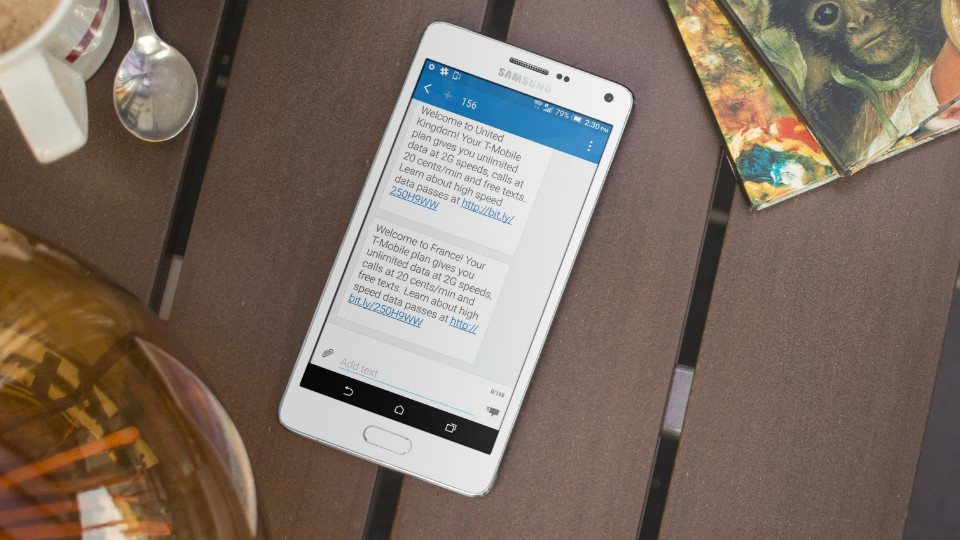
    Even when it does turn on, it can take some time for a phone to register on a roaming network to register before it starts receiving data. I'd give it 30 minutes.

    But some devices won't switch automatically, even though T-Mobile is known for its amazing data roaming. This official T-Mobile support page (last updated in 2015) states that:

    ...Devices on software version D85110m use a default APN is not configured to automatically switch to a roaming APN while traveling internationally.

    For some background, APN stands for "access point name," and is the gateway for access to a mobile network or data. These settings are commonly stored in the same place where roaming options are.

    Finding the APN in phone settings

    Getting to the APN will differ from phone to phone, but here are some basic guidelines. Generally it will be in the settings and networks section of the phone.

    In an HTC, scroll to Settings > Mobile Network settings > Access point names.

    In an iPhone, scroll to General > Mobile Data > Mobile Data Options > Mobile Data Network to access the APN. Unfortunately, it doesn't seem like the iPhone supports multiple APNs so it might be wise to take a screenshot of the default settings before changing them.

    The APN settings for roaming

    In this case, this is the backup APN settings for international data roaming (and the only parameters to set):

    Name: RoamingAPN (This can be anything. In our example it is "T-Mobile International Backup.")
    APN: epc.tmobile.com
    APN Protocol (if applicable): IPv4

    In our case, the default U.S. APN seems to work just fine, though it took the phone some time to register a roaming network and data signal (some 30+ minutes after hitting the tarmac in London). However, the epc.tmobile.com APN works does seem to work as well in the U.K. as the default U.S. settings so it's a good idea to keep both profiles in phone settings saved for constant data access.
    • Save

    Popular Posts

    Review: The Away Suitcase Disappoints in the Long Run

    The Best Away Luggage Alternatives

    Primary Sidebar

    TL;DR

    Both the U.S. and these extra settings work for T-Mobile's international data roaming. It is HIGHLY recommended to keep this backup info handy in case the default settings don't seem to work.

    Name: RoamingAPN (This can be anything. In our example it is “T-Mobile International Backup.”)
    APN: epc.tmobile.com
    APN Protocol (if applicable): IPv4

    👉 Add Map Happy to Google Preferred Sources

    Some posts contain affiliate links.
    These links support our work.
    This is our official policy on generative AI use.

    Erica Ho

    Erica Ho

    Erica Ho is a former reporter for TIME in Hong Kong and former geek at Gizmodo and Lifehacker. Her work has appeared in CNN, Yahoo!, MSN, Mashable, Travel + Leisure, Conde Nast Traveler and Quartz to name a few places.

    The good ol' days! I remember creeping as a former The good ol' days! I remember creeping as a former expat, and honestly, stumbling into the most random places as a traveler  😅 

It is not every day you stumble into someone else's living room for a private jazz concert, and if you happen to be down in Mexico City, check out @laa_esquina (send a DM!). 

Twice a month. It's the best kind of Saturday night, even if I can't stay up that late anymore!
    Follow on Instagram

    Footer

    ↑ back to top

    About

    • Privacy
    • Editorial Guidelines
    • Terms of Service
    • AI Disclosure

    Follow

    • email updates

    Contact

    FAQ


    Copyright © 2024 Map Happy

    • Facebook
    • Pinterest
    • Twitter
    • Reddit
    • WhatsApp
    • Email
    • Print