• Skip to primary navigation
  • Skip to main content
  • Skip to primary sidebar
Map Happy logo
  • Travel
    • Adventure
    • Leisure
    • Business
      • Loyalty
    • Student
    • Ladies
  • Trip Planning
    • Documentation
      • Customs
      • Passport
      • Visa
    • Reference Charts
    • Itinerary
    • Packing
    • Money
      • Budget
      • Luxury
      • Plastic
    • Technology
      • Photography
      • Connectivity
    • Language
  • Hacks
  • Transit
    • Flights
      • Airlines
      • Security
      • Airports
      • Lounges
    • Lodging
      • Hostels
      • Hotels
      • Vacation Rentals
        • Airbnb
    • Sea
      • Cruises
    • Ground
      • Bus
      • Cars
        • Taxis
          • Lyft
          • Uber
      • Public Transport
      • Trains
  • Expat
  • Features
    • Countries
      • Africa
      • Antarctica
      • Asia
      • Europe
      • North America
      • South America
      • Oceania
    • Guides
    • Culture & Science
    • Interviews
    • Opinion
  • Gear
    • Bags
  • Reviews
  • Tools
menu icon
go to homepage
  • Travel
    • Adventure
    • Leisure
    • Business
      • Loyalty
    • Student
    • Ladies
  • Trip Planning
    • Documentation
      • Customs
      • Passport
      • Visa
    • Reference Charts
    • Itinerary
    • Packing
    • Money
      • Budget
      • Luxury
      • Plastic
    • Technology
      • Photography
      • Connectivity
    • Language
  • Hacks
  • Transit
    • Flights
      • Airlines
      • Security
      • Airports
      • Lounges
    • Lodging
      • Hostels
      • Hotels
      • Vacation Rentals
        • Airbnb
    • Sea
      • Cruises
    • Ground
      • Bus
      • Cars
        • Taxis
          • Lyft
          • Uber
      • Public Transport
      • Trains
  • Expat
  • Features
    • Countries
      • Africa
      • Antarctica
      • Asia
      • Europe
      • North America
      • South America
      • Oceania
    • Guides
    • Culture & Science
    • Interviews
    • Opinion
  • Gear
    • Bags
  • Reviews
  • Tools
    • Facebook
    • Instagram
    • Pinterest
  • subscribe
    search icon
    Homepage link
    • Travel
      • Adventure
      • Leisure
      • Business
        • Loyalty
      • Student
      • Ladies
    • Trip Planning
      • Documentation
        • Customs
        • Passport
        • Visa
      • Reference Charts
      • Itinerary
      • Packing
      • Money
        • Budget
        • Luxury
        • Plastic
      • Technology
        • Photography
        • Connectivity
      • Language
    • Hacks
    • Transit
      • Flights
        • Airlines
        • Security
        • Airports
        • Lounges
      • Lodging
        • Hostels
        • Hotels
        • Vacation Rentals
          • Airbnb
      • Sea
        • Cruises
      • Ground
        • Bus
        • Cars
          • Taxis
            • Lyft
            • Uber
        • Public Transport
        • Trains
    • Expat
    • Features
      • Countries
        • Africa
        • Antarctica
        • Asia
        • Europe
        • North America
        • South America
        • Oceania
      • Guides
      • Culture & Science
      • Interviews
      • Opinion
    • Gear
      • Bags
    • Reviews
    • Tools
    • Facebook
    • Instagram
    • Pinterest
  • ×

    How To Easily Remove Tourists from Photos (Using Google Pixel)

    Published/Updated: Jul 2, 2025 · Erica Ho · 2 minute read

    Here's our guide to removing tourists with a Google Pixel in literally seconds.

    Google's latest line of Pixels, starting with the 6 series and upwards, includes a photo tool called Magic Eraser that can remove tourists and unwanted objects from a photo easily.

    It is rather effortless, done in seconds and surprisingly effective, making us think the Google Pixel 6a we upgraded to one of the best decisions we ever made.1

    (Side note: The cameras on the Google Pixels are legendary. If your phone is your primary camera on vacation, consider investing in one. Though it is no substitute for a DSLR, we use them for our own business social media account.)

    In short, the Magic Eraser algorithm is pretty great at automatically detecting suggestions and removing unwanted objects or people effortlessly.

    It's not perfect, though: Manually using Magic Eraser tends to yield lower quality results, though they aren't that noticeable to the casual viewer, especially if someone is looking at the photo on a small device.

    Shadows (from people and things) also have to be manually removed.

    Surprisingly, this feature also works well for pictures taken on another mobile device, as long as you're doing the editing with a Google Pixel! Huzzah.

    See the full results of what it was like to play around with Magic Eraser for a full day below.

    How to use Magic Eraser to get rid of tourists

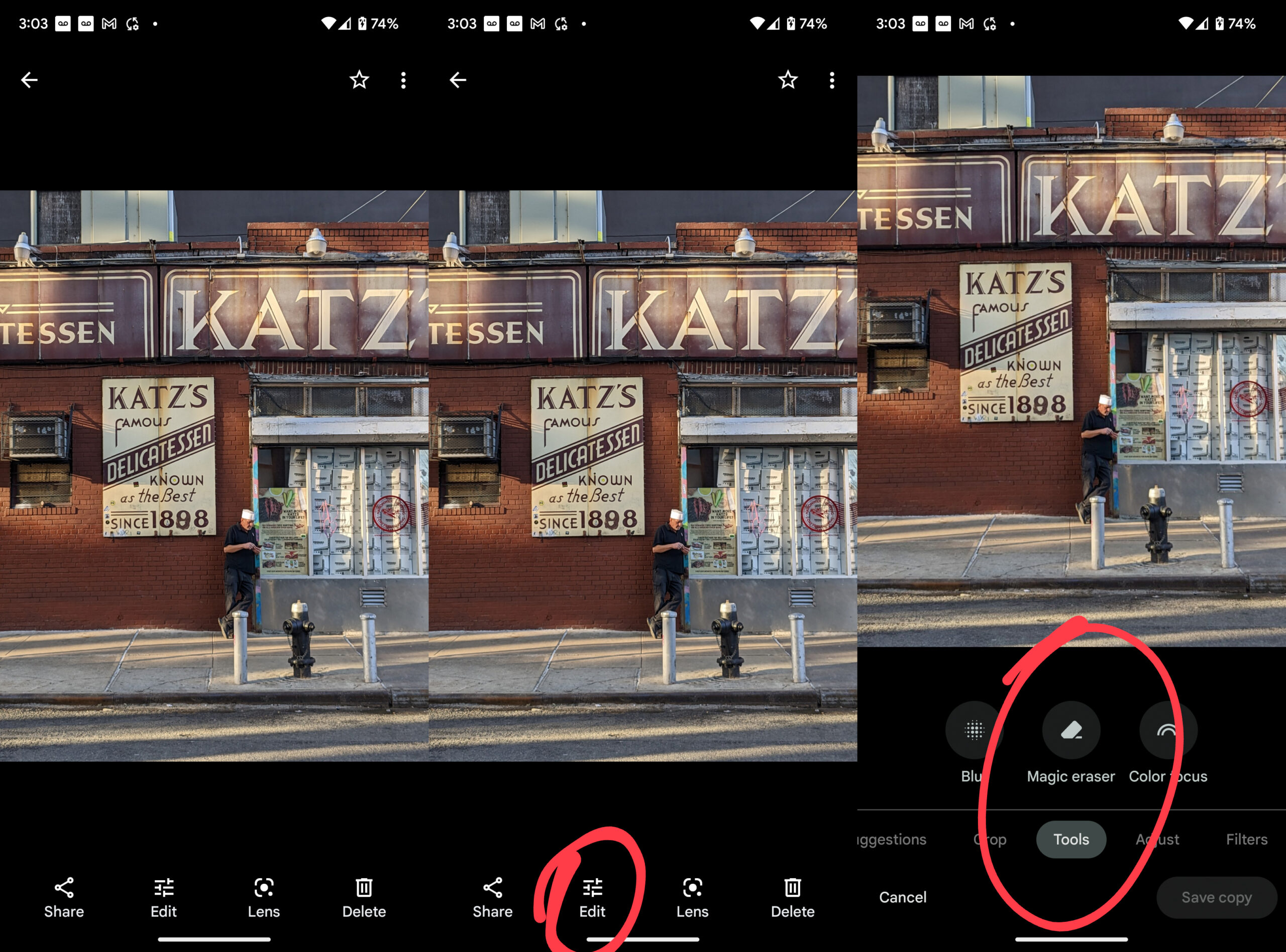
    In Google Photos app, scroll to the photo that needs to be edited.

    If the suggestion isn't made, click Edit, select Tools on the bottommost menu, and then click Magic Eraser.
    • Save

    Click to enlarge.

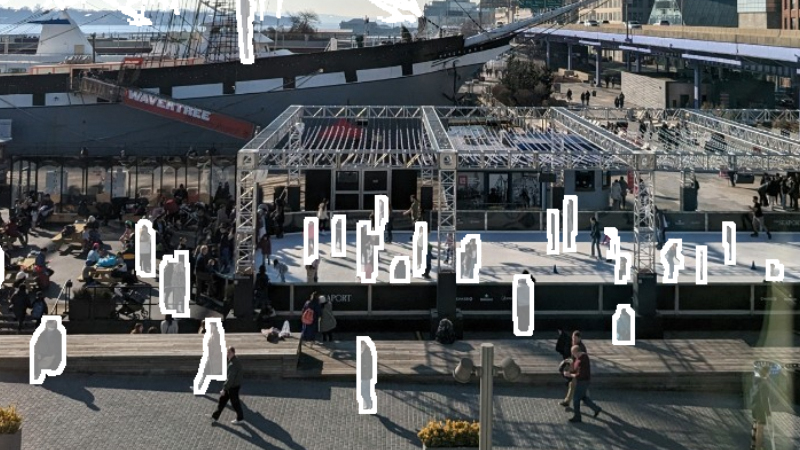
    It will automatically make a few suggestions. If nothing is selected, it is possible to brush the area that you wish to remove.

    Here are a few videos demonstrating how it is done:

    Automatic photo results using Magic Eraser

    In general, automatic suggestions using Magic Eraser yielded the best results. Hate to say it: The algorithm does the best at detecting the photos that will deliver the best results.

    For these photos, a simple suggestion will simply pop up at the bottom in Google Photos when you're browsing through them.

    These photos tend to have smaller objects in the background, where there is a clear point of focus. 

    Here's a quick example of what the results yielded below.
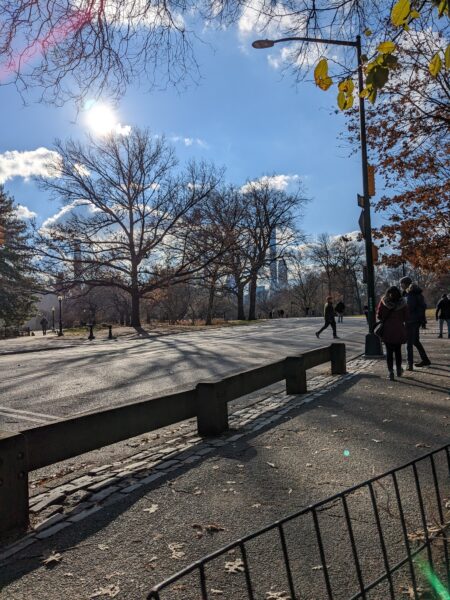
    • Save
    Before
    • Save
    After

    Photo results using manual Magic Eraser

    Photos where Magic Eraser had to be selected yielded the lowest quality, though in our opinion, they still aren't that bad for sharing on social media.

    Here are three examples where deliberately applying Magic Eraser yielded less than ideal results (though, honestly, we thought wasn't too noticeable unless you were really paying attention!). 

    The first two examples show were Magic Eraser is applied to a large object, where the third example portrays what happens the feature accidentally removes part of our beautiful setting.

    Nom Wah Restaurant, New York, NY
    Nom Wah Restaurant, New York, NY
    Looking outside the Tin Building, New York, NY.

    Photo results using automatic and manual Magic Eraser

    This led us to wonder to what photos might look like by applying both the automatic and manual processes of Magic Eraser.

    This photo features the interior of the recently renovated and new opening of the Tin Building in the South Seaport area in New York, NY.

    In this example, Magic Eraser is used to scrub a few people out of the people. That said, it didn't remove everything, so we went ahead and manually applied Magic Eraser to other parts of the photo.

    More or less, we ended up being pretty pleased with the final result, which is shown below.

    Just proof that not all phones are created equal, nor all cameras are created equal.

    1 footnote
    1. This is not to discount the Google Pixel 7 Pro! We just didn't have an opportunity to test out this device. ↩
    • Save

    Popular Posts

    The Best One-Way Car Rental Discount Codes

    Baggage Restrictions You Probably Don’t Know About Amtrak

    Primary Sidebar

    TL;DR

    The Google Pixel 6a we upgraded to one of the best decisions we ever made.

    👉 Add Map Happy to Google Preferred Sources

    Some posts contain affiliate links.
    These links support our work.
    This is our official policy on generative AI use.

    Erica Ho

    Erica Ho

    Erica Ho is a former reporter for TIME in Hong Kong and former geek at Gizmodo and Lifehacker. Her work has appeared in CNN, Yahoo!, MSN, Mashable, Travel + Leisure, Conde Nast Traveler and Quartz to name a few places.

    The good ol' days! I remember creeping as a former The good ol' days! I remember creeping as a former expat, and honestly, stumbling into the most random places as a traveler  😅 

It is not every day you stumble into someone else's living room for a private jazz concert, and if you happen to be down in Mexico City, check out @laa_esquina (send a DM!). 

Twice a month. It's the best kind of Saturday night, even if I can't stay up that late anymore!
    Follow on Instagram

    Footer

    ↑ back to top

    About

    • Privacy
    • Editorial Guidelines
    • Terms of Service
    • AI Disclosure

    Follow

    • email updates

    Contact

    FAQ


    Copyright © 2024 Map Happy

    • Facebook
    • Pinterest
    • Twitter
    • Reddit
    • WhatsApp
    • Email
    • Print