
If you're a loyal Map Happy reader or simply want to support, Google's Preferred Sources feature is the way to make sure our content shows up first. (Our traffic is getting killed by Google, so you'd be doing your girl a favor.)
This feature lets you choose which outlets you'd like to prioritize in the Top Stories section of search results.
That way, whenever Map Happy has covered a topic you're searching for like the best carry-on suitcase or a guide on how to live abroad, it will appear more prominently instead of getting lost among generic travel content, and, umm, there's a lot of that.
Not throwing shade or anything.
Here's how to set it up.
1. Go to Google's Preferred Sources Page
Click here to head to the Google settings where you can pick your go-to outlets. The interface includes a search bar labeled Search by name or website.
2. Add Map Happy to your Google sources
Type Map Happy into the search bar (or enter maphappy.org).
Once it pops up, simply check the box to select it:
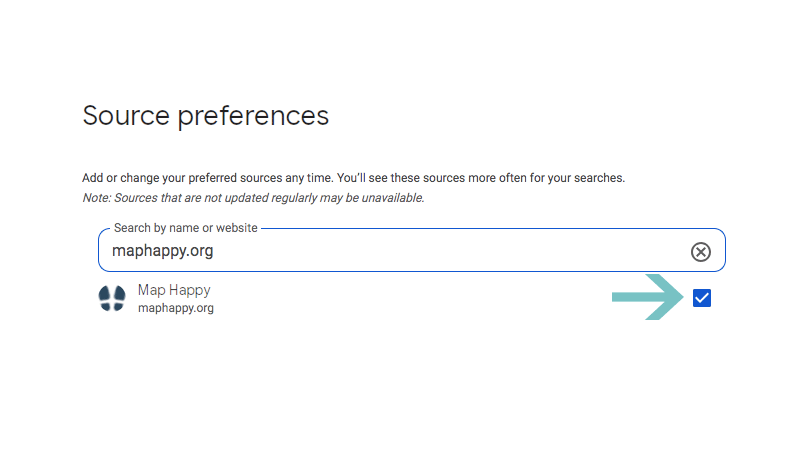
Select the checkbox. (Courtesy of Map Happy)
3. Refresh those search results!
That's it! The next time you Google something travel-related, you'll see Map Happy stories highlighted in the Top Stories box whenever they're relevant.
This method applies across the entire internet
You're not limited to just one outlet. You can add other trusted sources for a more tailored search experience-whether that's other travel sites, lifestyle publications, or news outlets.
(Shouting out some of our favorite pubs, The Woks of Life, Just One Cookbook, Astrostyle, Going Awesome Places.)
But with this, you'll always know our stories have a better chance of surfacing first.