
• Skip to primary navigation
  • Skip to main content
  • Skip to primary sidebar
Map Happy logo
  • Travel
    • Adventure
    • Leisure
    • Business
      • Loyalty
    • Student
    • Ladies
  • Trip Planning
    • Documentation
      • Customs
      • Passport
      • Visa
    • Reference Charts
    • Itinerary
    • Packing
    • Money
      • Budget
      • Luxury
      • Plastic
    • Technology
      • Photography
      • Connectivity
    • Language
  • Hacks
  • Transit
    • Flights
      • Airlines
      • Security
      • Airports
      • Lounges
    • Lodging
      • Hostels
      • Hotels
      • Vacation Rentals
        • Airbnb
    • Sea
      • Cruises
    • Ground
      • Bus
      • Cars
        • Taxis
          • Lyft
          • Uber
      • Public Transport
      • Trains
  • Expat
  • Features
    • Countries
      • Africa
      • Antarctica
      • Asia
      • Europe
      • North America
      • South America
      • Oceania
    • Guides
    • Culture & Science
    • Interviews
    • Opinion
  • Gear
    • Bags
  • Reviews
  • Tools
menu icon
go to homepage
  • Travel
    • Adventure
    • Leisure
    • Business
      • Loyalty
    • Student
    • Ladies
  • Trip Planning
    • Documentation
      • Customs
      • Passport
      • Visa
    • Reference Charts
    • Itinerary
    • Packing
    • Money
      • Budget
      • Luxury
      • Plastic
    • Technology
      • Photography
      • Connectivity
    • Language
  • Hacks
  • Transit
    • Flights
      • Airlines
      • Security
      • Airports
      • Lounges
    • Lodging
      • Hostels
      • Hotels
      • Vacation Rentals
        • Airbnb
    • Sea
      • Cruises
    • Ground
      • Bus
      • Cars
        • Taxis
          • Lyft
          • Uber
      • Public Transport
      • Trains
  • Expat
  • Features
    • Countries
      • Africa
      • Antarctica
      • Asia
      • Europe
      • North America
      • South America
      • Oceania
    • Guides
    • Culture & Science
    • Interviews
    • Opinion
  • Gear
    • Bags
  • Reviews
  • Tools
    • Facebook
    • Instagram
    • Pinterest
  • subscribe
    search icon
    Homepage link
    • Travel
      • Adventure
      • Leisure
      • Business
        • Loyalty
      • Student
      • Ladies
    • Trip Planning
      • Documentation
        • Customs
        • Passport
        • Visa
      • Reference Charts
      • Itinerary
      • Packing
      • Money
        • Budget
        • Luxury
        • Plastic
      • Technology
        • Photography
        • Connectivity
      • Language
    • Hacks
    • Transit
      • Flights
        • Airlines
        • Security
        • Airports
        • Lounges
      • Lodging
        • Hostels
        • Hotels
        • Vacation Rentals
          • Airbnb
      • Sea
        • Cruises
      • Ground
        • Bus
        • Cars
          • Taxis
            • Lyft
            • Uber
        • Public Transport
        • Trains
    • Expat
    • Features
      • Countries
        • Africa
        • Antarctica
        • Asia
        • Europe
        • North America
        • South America
        • Oceania
      • Guides
      • Culture & Science
      • Interviews
      • Opinion
    • Gear
      • Bags
    • Reviews
    • Tools
    • Facebook
    • Instagram
    • Pinterest
  • ×

    The My TSA App Is Actually an App You Need

    Published/Updated: Nov 20, 2025 · Erica Ho · 1 minute read

    Placeit

    I know: it's a government app. But it's the one government app out there that isn't completely useless.

    To be fair, it wasn't until Karina checked out the TSA's Instagram account that I was aware that TSA had its own app. Since it's my job to be interested in travel tech-and my policy is to always give each service a fair chance-I decided to check it out, expecting that, truthfully, I'd end up uninstalling it. Strangely, that's not what happened.

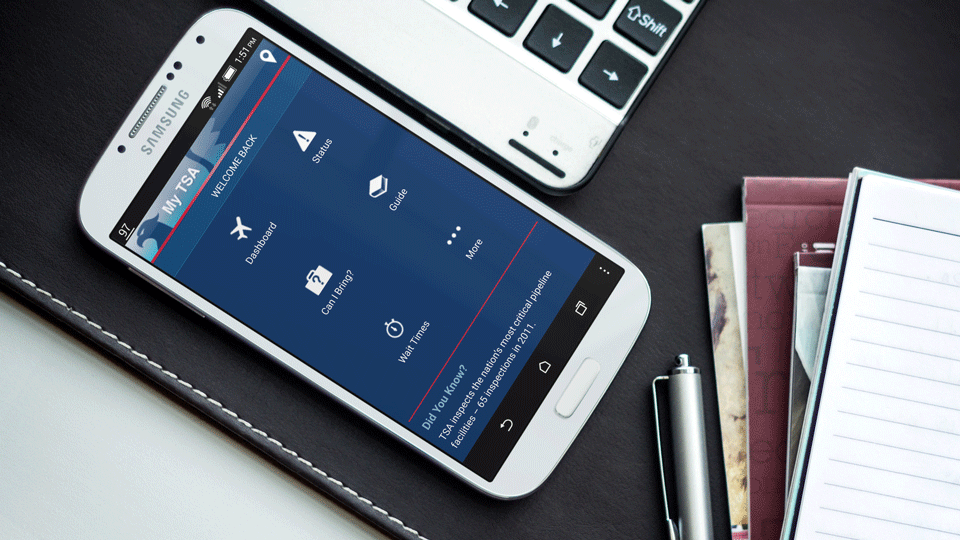
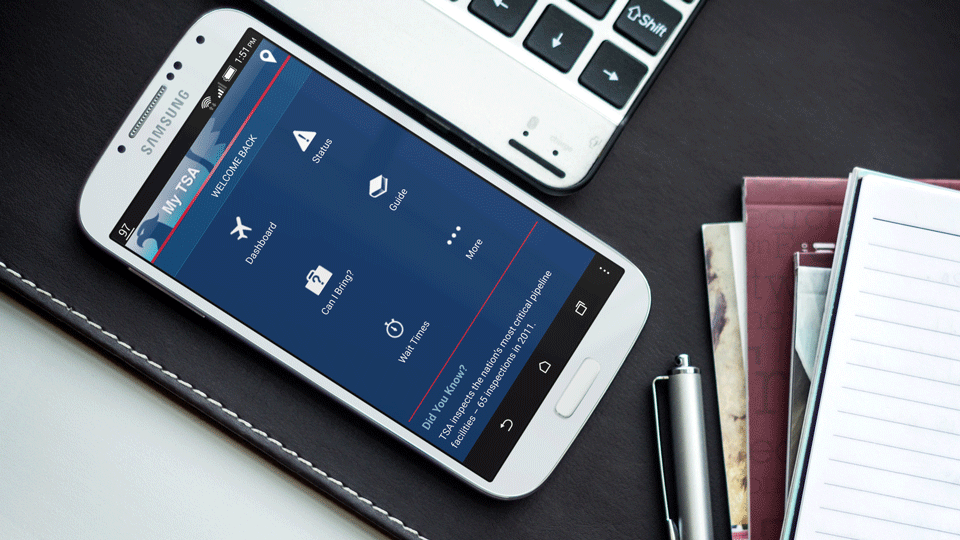
    The My TSA app is available on the iTunes and Google Play store as free download. To demonstrate how actually OK of an app it is, I've downloaded it and provided some nice screenshots down below so you can determine whether it's worth the 10 seconds that it takes to open the app store, look for the My TSA app and see if it deserves a precious 10 MB on your phone. (It does.)

    There's one app feature I'm particularly fond of. I also admit that it's only for this one feature that I like it (which I guess is sometimes all you really need), but it's enough to make me keep the app. The Can I Bring? section lets users type just about any item they can think of into the app-from ice skates to gravy-to see if what they're bringing on the plane is permissible.

    Trust me, it's nice when you're throwing everything into a suitcase at the last minute and run across a questionable item. Or when out shopping for souvenirs and finding a strange trinket. Whip out the phone, open up the app and BAM! There's the answer, straight from the source. It's almost like having access to your own personal TSA rep.

    Then again, I guess I like to carry a lot of weird things on the plane.

    The other feature sets are negligible. The Dashboard, for example, is a bit useless as it aggregates all flight delays at the airport you're flying out to show an average delay time. There's only one delay I care about and that's my flight. Next.

    The app's Wait Times are actually a stroke of genius-that is, they would be, if more people were using the feature. It shows actual security wait times, as reported by passengers going through specific terminals at a selected airport. This would be awesome if people reported wait times more often, rather than sporadically. But until the My TSA app beats Angry Birds in the app store, I'm not holding my breath.

    Passengers unfamiliar with TSA procedures can reference everything they need in the app. It cover topics like how to dress, what counts as an ID, special medical needs, how to travel with children, what TSA PreCheck is and, more importantly, how to complain in case the TSA should piss you off. You read that right.

    Honestly, given the fact that it costs exactly nothing and prevents carry-on issues at the airport, yes, it's totally worth the download. Just do it.

    • Save

    Popular Posts

    T-Mobile Travel Offers Up to 40% Discount on Car Rentals

    How To Live In Two Different Places at Once

    Primary Sidebar

    TL;DR

    The My TSA app is available on the iTunes and Google Play store as free download.

    👉 Add Map Happy to Google Preferred Sources

    Some posts contain affiliate links.
    These links support our work.
    This is our official policy on generative AI use.

    Erica Ho

    Erica Ho

    Erica Ho is a former reporter for TIME in Hong Kong and former geek at Gizmodo and Lifehacker. Her work has appeared in CNN, Yahoo!, MSN, Mashable, Travel + Leisure, Conde Nast Traveler and Quartz to name a few places.

    The good ol' days! I remember creeping as a former The good ol' days! I remember creeping as a former expat, and honestly, stumbling into the most random places as a traveler  😅 

It is not every day you stumble into someone else's living room for a private jazz concert, and if you happen to be down in Mexico City, check out @laa_esquina (send a DM!). 

Twice a month. It's the best kind of Saturday night, even if I can't stay up that late anymore!
    Follow on Instagram

    Footer

    ↑ back to top

    About

    • Privacy
    • Editorial Guidelines
    • Terms of Service
    • AI Disclosure

    Follow

    • email updates

    Contact

    FAQ


    Copyright © 2024 Map Happy

    • Facebook
    • Pinterest
    • Twitter
    • Reddit
    • WhatsApp
    • Email
    • Print