
Because this is a good of example of not using Kayak for all your flight search needs.
Kayak is not a terrible option all things considered but for real control over all the flight-searching processes possible, there's nothing better than ITA Matrix. Now, I'm pretty good at putting together an open-jaw flight or using it to quote me a cheaper currency but user SeattleFred at FlyerTalk has got me beat hands down. Guys, this is a list that will shame most travel hackers.
It has everything from specifying airlines (or alliances) to setting both a minimum and a maximum connection time before even most people hit the search button, eliminating the need to filter through results. Most frequent flyers will find it particularly useful to filter out things like small planes, exclude codeshares or to even add a long layover. More occasional flyers can use it to eliminate red-flights and any flights that require an overnight stop.
In fact, it's so detailed that even a ITA Matrix rep chimed in and added a couple of tricks to the full repertoire.
Please note: Putting together this reference sheet couldn't be possible without all the help of the great FlyerTalk users out there! I've elaborated a bit and color-coded things to make it easier to understand. For a more comprehensive list, please check the original thread.
Jump to a specific section:
- Brief note on formatting and syntax
- Excluding specific things like red-eye flights
- Setting a minimum and maximum connection time
- Add extra time to the minimum connection time
- Staying loyal to an airline or an alliance
- Excluding certain airlines
- Quick cheatsheet to it all
- Putting it all together
A brief note on formatting
There are a couple of things to keep in mind for the code to work. Airport and airline codes must be an IATA code for the syystem to recognize it; keep these reference links handy in an open tab if you're not sure.
The format generally is the airport IATA code with a ::/ appended to signify a filter. Most codes start with a dash (-) with the exception of a few commands. In order for the command to work, it must be put in both the "to" and "from" field.
Here's a quick example of the format most commands use and how they look typed into Google ITA Matrix.
formatXXX ::/ command XXlegendairport-code ::/ command specifier
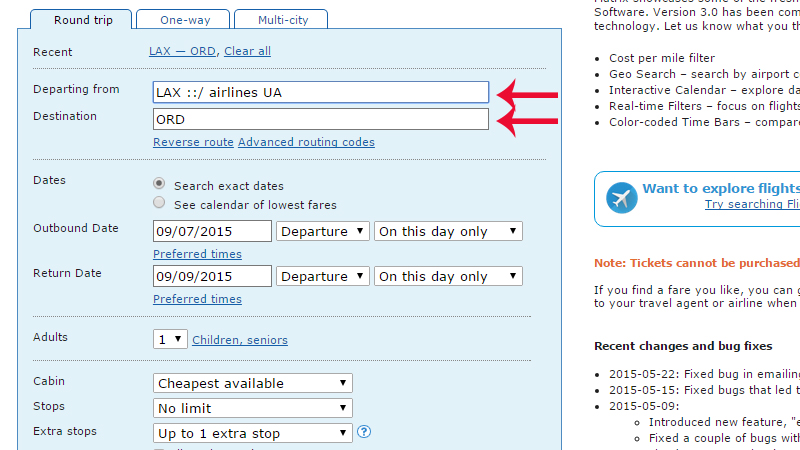
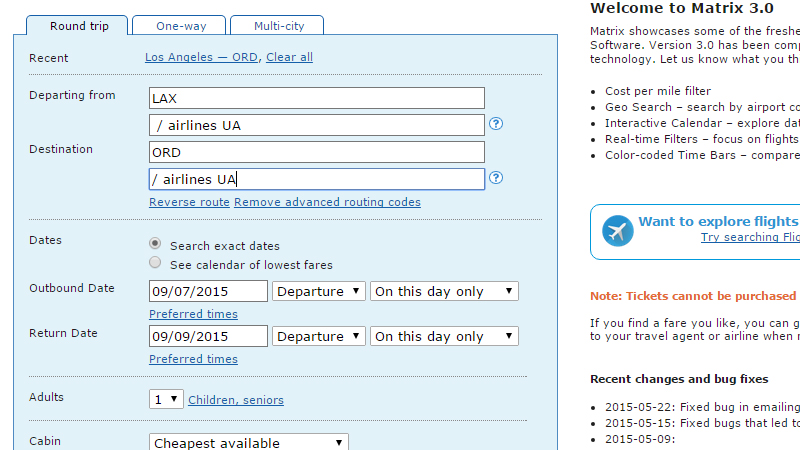
If you're using the website, don't be surprised to see the code automatically expand like this:
No more red-eye flights and propeller planes, please
Finally, a way to filter those crazy search results before you even get to the results page. There is a chart of commands below that can be used to exclude certain criteria including red-eye flights, helicopters and even codeshares. More than one exclusion can be added by adding a comma and a space. (Note: This doesn't work in the reverse, so you can't choose to search for first-class flights only. That's a problem I wish I had.)
| Command | What it excludes |
|---|---|
-nofirstclass |
Exclude flights that do not have a first-class cabin. (Basically, all flights for the city pair must have a first-class cabin). |
-codeshare |
No codeshares. |
-overnight |
No overnight stops. |
-change |
No airport changes. |
-redeye |
No red-eye flights. |
-prop |
No propeller planes. |
-train |
No trains. |
-surface |
No surface transportation. |
-helicopter |
No helicopter. |
formatXXX ::/ exclusionlegendairport-code ::/exclusionexampleBOS ::/ -overnight, -change, -redeye, -prop
The example says to consider Boston flights and to exclude overnight stops, red-eye flights or any connections. Yass.
Got a minimum and maximum connection time in mind?
There's a way to do this too in case you want to grab a few extra hours finding BBQ in Dallas on the way over to New York. This can be specified with the minconnect and maxconnect code.
formatXXX ::/ t 00legendairport-code ::/ minconnect minexample LAX::/minconnect 60, maxconnect 120
The example says to make sure the connection is between 60 to 120 minutes.
Make sure you don't miss a connection
By definition, most airlines can't sell a layover than that's shorter than the minimum connecting time (MCT). Philippine Airlines has a good definition of what this is: "The minimum Connecting time is the amount of transfer time, agreed in advance between airlines and airport authorities, that is considered sufficient for a passenger to make a connection between an arriving flight and a departing flight." Basically, the airlines basically have to make sure passengers aren't SOLTK.
In case, you're feeling worried and want to add a couple of extra minutes to MCT-cause, really, no one knows this stuff off the top of their head-there's an easy way to do this through the padconnect command.
formatXXX ::/ padconnect 00legendairport-code ::/ padconnect minexampleBOS ::/ padconnect 20
The example says that 20 minutes is added to pad the minimum connecting time.
Loyal to an airline or an alliance?
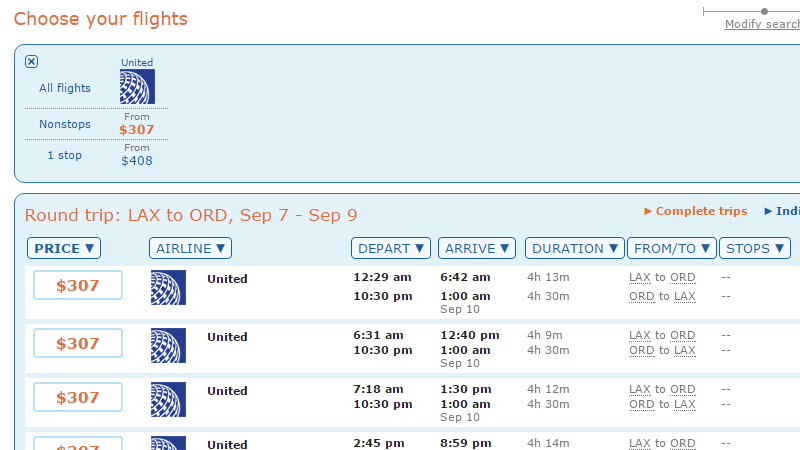
Finally, the one thing I've been looking for. Sometimes it pays to go with the cheapest bidder but every flight is an opportunity to score some miles with whatever frequent flyer programTK and is also another opportunity to gain statusTK.
Most frequent flyer programs don't require passengers to fly on a specific airline to gain miles, just that it's in the same alliance as the frequent flyer program. To specify one just use the alliance command. Acceptable criteria include star-alliance, oneworld and skyteam.
formatXXX ::/ alliance XXlegendairport-code ::/alliancespecific-allianceexampleLAX ::/ alliance star-alliance
The example says to consider Los Angeles flights on Star Alliance flights only.
To look for a specific airline (or airlines) just use the airlines XX code.
formatXXX ::/ airlines XXlegendairport-code ::/airlines airline-codeexampleBOS ::/ airlines AA DL
The example says to consider Boston flights on American Airlines and Delta Airlines only.
Or exclude the bad airlines...
Like Spirit. The formatting is very similar to to format above, except a - is appended to the front of the airlines command.
formatXXX ::/ -airlines XXlegendairport-code ::/ -airlines airline-codeexampleBOS ::/ -airlines AA DL
The example says to exclude Boston flights on American Airlines and Delta Airlines.
The cheatsheet in one easy place
Basically, a quick summary below.
| Command | What it does |
|---|---|
minconnect |
Sets minimum connecting time in minutes. |
maxconnect |
Sets maximum connecting time in minutes. |
padconnect |
Sets extra minutes on top of the minimum connecting time. |
alliance |
Sets alliance. Acceptable terms are star-alliance, oneworld and skyteam. |
airlines |
Specifies airlines to search for. |
-airlines |
Excludes airlines in search. |
Putting a bunch of things together
It's not hard to but a punch of things. Just make sure to string and separate them with commas.
BOS :: UA UA / f bc=l|bc=y, -redeye, -prop